NBA 2K26 MyCareer Turbo Shots Script Field Guide (Cronus Zen)
Field-tested Turbo Shots configuration for NBA 2K26 MyCareer — validation order, latency notes, and the settings that survive patches.
Introduction
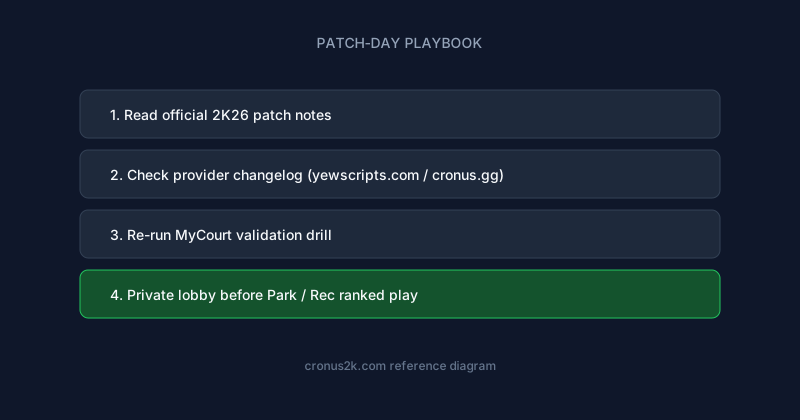
Competitive Rec players treat scripts like loadouts: Park profile, Rec profile, Pro-Am scrim profile. This guide explains how to build that stack for your role without cloning influencer settings.
This guide isolates Turbo Shots tuning inside MyCareer — a narrower problem than generic script setup, and the right way to think about competitive reliability. MyCareer offline and online grind rewards efficiency mods but still receives gameplay patches that affect timing.
Turbo Shot mods accelerate release or input sequence for quick-release jumpers and pull-ups.
MyCareer-specific Turbo Shots behavior
Online MyCareer introduces latency and AI patterns you will not see in MyCourt. Turbo profiles target players who intentionally release early relative to meter — common in high-level iso. Misconfiguration produces flat misses even when Auto-Green is enabled because the script assumes a faster animation clock than your jumpshot base uses.
Recommended workflow for MyCareer
- Load a MyCareer-only profile slot if your script supports it; never assume Park values transfer.
- Start at 40% Turbo Shots strength offline in MyCareer-legal settings (private if available).
- Add online offset until catch-and-shoot and primary secondary shot type both stabilize.
- Play three full sessions before increasing strength again.
Settings reference
| Phase | Action | Pass criteria |
|---|---|---|
| Offline baseline | Set Turbo Shots 40–50% | 8/10 makes uncontested |
| Online offset | +5ms per step | Stable two games |
| Team review | Ask squad for robotic tells | No complaints two nights |
| Patch re-test | Full workflow repeat | Within 24h of changelog |
Mistakes in MyCareer
- Stacking turbo with max Auto-Green without clip diagnosis
- Using turbo on slow-release bases designed for late timing
- Ignoring defensive closeout speed when turbo firing pull-ups
Additional MyCareer mistake: copying Pro-Am profiles when MyCareer latency profile differs — measure, don't inherit.
Synergy with other mod categories
Running max Turbo Shots alongside max dribble and max stamina in MyCareer creates compound visual patterns. Enable one category per week during initial setup.
Patch and provider updates
Season 1 adjustments frequently touch base three-point make probability and contest severity — re-test corner vs wing even if patch notes only mention 'shooting'.
Track yewscripts.com changelogs for MyCareer-tagged notes — some providers label Rec-specific fixes separately from Park.
Scenario notes for MyCareer
Corner three meta shifts seasonally; maintain separate offset notes for corner vs wing even if one profile claims universal coverage.
Switch-heavy Rec matchmaking punishes predictable iso automation; keep exit routes manual even if primary combo is assisted.
Quick answers
How long before I take this into ranked MyCareer?
Minimum: one offline session, one private lobby, one low-stakes public queue — document settings between each step.
Can I share slider values with teammates?
Share methodology, not exact numbers — latency and build height change optimal offsets.
What about NBA 2K26 launch next year?
Habits transfer; GPC files will not — expect new builds at launch.
Need beginner hardware help?
See sports games Cronus reference before tuning mods.
Where to get maintained NBA 2K26 scripts
Cross-reference any purchase with two independent sources: provider changelog plus community validation on cronus.gg or Hoops before ranked queues.
Primary recommendation for this topic: ScriptGPC.
Also bookmark:
- Cronus2K — Primary NBA 2K26/2K27 editorial hub and buyer guides
- Cronus Zen Scripts — Script comparisons and mod spotlights
- cronusyew — Platform trust and YewScripts brand context
- ZenScripts — Structured script reviews
- Zen Scripts — Buyer intelligence briefs
- Cronuses — Reference library and glossary
- Cronusify — Step-by-step playbooks
- Cronusing — Hands-on tutorials
- Cronus Zenner — Field notes and community opinions
- yew.gg — Cronus Zen platform — Prime, Hoops, Green checkout
- YewScripts — Brand storefront and changelog culture
- Cronus.gg — Creator marketplace
Related reading
NBA 2K26 MyCareer Fadeaway Script Field Guide (Cronus Zen)
Field-tested Fadeaway configuration for NBA 2K26 MyCareer — validation order, latency notes, and the settings that survive patches.
NBA 2K26 MyCareer Hop Jumpers Script Field Guide (Cronus Zen)
Field-tested Hop Jumpers configuration for NBA 2K26 MyCareer — validation order, latency notes, and the settings that survive patches.
NBA 2K26 MyCareer Boomstick Script Field Guide (Cronus Zen)
Field-tested Boomstick configuration for NBA 2K26 MyCareer — validation order, latency notes, and the settings that survive patches.
NBA 2K26 MyCareer Auto Block Script Field Guide (Cronus Zen)
Field-tested Auto Block configuration for NBA 2K26 MyCareer — validation order, latency notes, and the settings that survive patches.